What Machine Ready – Drawer Out means on your Dacor coffee machine (dacor coffee machine drawer out)
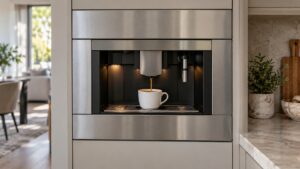
Dacor coffee machine drawer out is a full-sentence display message on the CM24P-1 and CM24T-1 Automatic Coffee System — this platform never uses alphanumeric error codes, only plain-language messages, and that is worth stating plainly rather than inventing a code form for it. The message means the used coffee-grounds drawer is not seated fully in place, and the machine disables its brewing buttons until the drawer is confirmed correctly installed. This is one of the simplest conditions on the whole message table: a drawer that looks closed but has not clicked fully home reads the same to the sensor as one left fully open.
Symptoms
Run your eye down this list and compare it with the coffee machine in front of you, because Machine Ready – Drawer Out shares its symptoms with several other coffee machine problems.
- The display reads “Machine Ready – Drawer Out” and all brewing buttons are disabled.
- The used-grounds drawer appears visually closed but may not be pushed in all the way.
- The message can appear right after emptying and replacing the drawer during routine cleaning.
- Buttons remain unresponsive until the drawer message clears on its own.
- The message can recur if the drawer is bumped or jarred loose during use of a nearby cabinet or drawer.
Common causes
The list below covers what actually causes Machine Ready – Drawer Out on a coffee machine, in the order a technician would eliminate them on a Dacor coffee machine.
- Drawer not pushed fully in — the most common cause, especially right after emptying the grounds.
- Debris in the drawer track — grounds or residue in the slot can prevent the drawer from seating completely.
- Warped or damaged drawer — a drawer that no longer sits flush cannot trigger the sensor correctly even when pushed in.
- Failed drawer sensor switch — the switch itself is not detecting a drawer that is genuinely seated correctly.
- A drawer replaced with one that is not the correct match — using a drawer from a different unit or a worn replacement can affect fit.
Troubleshooting steps you can try
An owner can safely attempt everything below on a coffee machine, and everything beyond it on a Dacor coffee machine is a technician’s job, with no shame in stopping early.
- Remove the drawer completely, empty any remaining grounds, and check the track for debris.
- Wipe the track clean of any grounds or residue that could be preventing a full seat.
- Reinsert the drawer and push firmly until it stops, checking that it sits flush with the front panel.
- Confirm the message clears once the drawer is fully seated before attempting to brew.
- If the message persists with the drawer visibly flush, try removing and reseating it a second time.
Parts a technician may replace
The used-grounds drawer and drawer sensor switch are what a technician examines on a coffee machine showing this problem. Genuine parts are fitted to the coffee machine, matched to your exact coffee machine rather than to the family it belongs to.
When to call a technician
If the drawer sits flush and fully seated but the message will not clear, the drawer sensor switch likely needs testing, which is a quick technician visit rather than a major repair. This rates Low on a coffee machine, so take your time — but do not keep clearing Machine Ready – Drawer Out on the coffee machine without finding out why. We are independent technicians rather than Dacor’s, and the labor on your coffee machine carries a 30-day warranty.
Related help and Dacor resources
If the checks above did not clear the Machine Ready – Drawer Out condition, book a technician for the coffee machine. Our coffee machine problem index covers the neighboring problems, and www.dacor.com carries the coffee machine spec.