What d0 means on your Dacor cooktop (dacor cooktop d0)
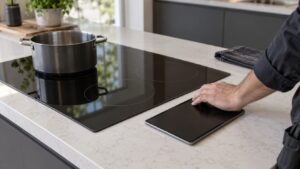
Dacor cooktop d0 is the lowest-severity code in the Modernist induction table: the touch panel has detected the same key held down, or effectively pressed, for a continuous eight seconds. Because the cooktop’s controls are capacitive touch zones on the glass rather than physical buttons, water, condensation, or a stray object resting on the surface can all register the same way a genuinely held key would. This code exists purely to protect against a phantom input running a zone unattended, and it typically clears the moment whatever is triggering it is removed.
Symptoms
Symptoms are how a cooktop narrows the field, and the ones below are specific enough to separate d0 from its neighbors on a Dacor cooktop.
- The display shows d0 and the touch controls stop accepting further input.
- A single icon or zone indicator may stay lit continuously on the glass.
- D0 often appears right after wiping the cooktop down while it is still wet.
- The problem can also follow condensation settling near the control area after a boiling pot has been nearby.
- The code clears within seconds of drying the panel or removing whatever is resting on it.
Common causes
Several different problems can put a Dacor cooktop into this state, and working through them in order of likelihood is what keeps a cooktop repair to what it actually needs.
- Liquid or condensation on the glass near the controls — moisture bridging two touch zones reads as a key held down.
- An object, cloth, or utensil resting on the control area — physical contact during cooking or cleaning is the most common trigger.
- Grease film buildup over the touch zones — cooking residue can create a persistent false touch reading.
- A failed touch zone under the glass — the underlying sensor for one key has degraded and reads as always active.
- Main PCB misreading a healthy panel — less common, but the touch-scanning logic can also be responsible.
Troubleshooting steps you can try
These checks cost you nothing on a cooktop and often end the problem there; anything harder on a Dacor cooktop needs a technician.
- Wipe the entire cooktop surface dry with a soft cloth and confirm nothing is resting on the control area.
- Wait a few seconds after wiping, since the code is defined around the eight-second persistence window.
- If d0 clears, run each zone through its normal power-level adjustment once to confirm no key is still misbehaving.
- If the code returns without any liquid or object present, note which specific icon or zone seems affected.
- Avoid spraying cleaner directly onto the glass near the controls, since residue can retrigger the same problem.
Parts a technician may replace
A technician will work through the touch control panel and glass surface near control area on your cooktop. Genuine OEM or trusted-supplier parts are matched to the cooktop by model and serial number rather than fitted to a cooktop on spec.
When to call a technician
If d0 keeps returning on a clean, dry cooktop with nothing touching the surface, the touch zone under the glass likely needs testing, which is a quick technician visit rather than a major repair. Low severity means the cooktop can wait, but a recurring d0 on a cooktop should be diagnosed rather than ignored. This is independent service for your cooktop — genuine OEM or trusted-supplier parts, and a 30-day warranty on the labor.
Related help and Dacor resources
Still seeing the d0 condition on the cooktop? Schedule a cooktop visit, or work through our other cooktop problem pages. www.dacor.com has the factory data for your cooktop.